The short answer
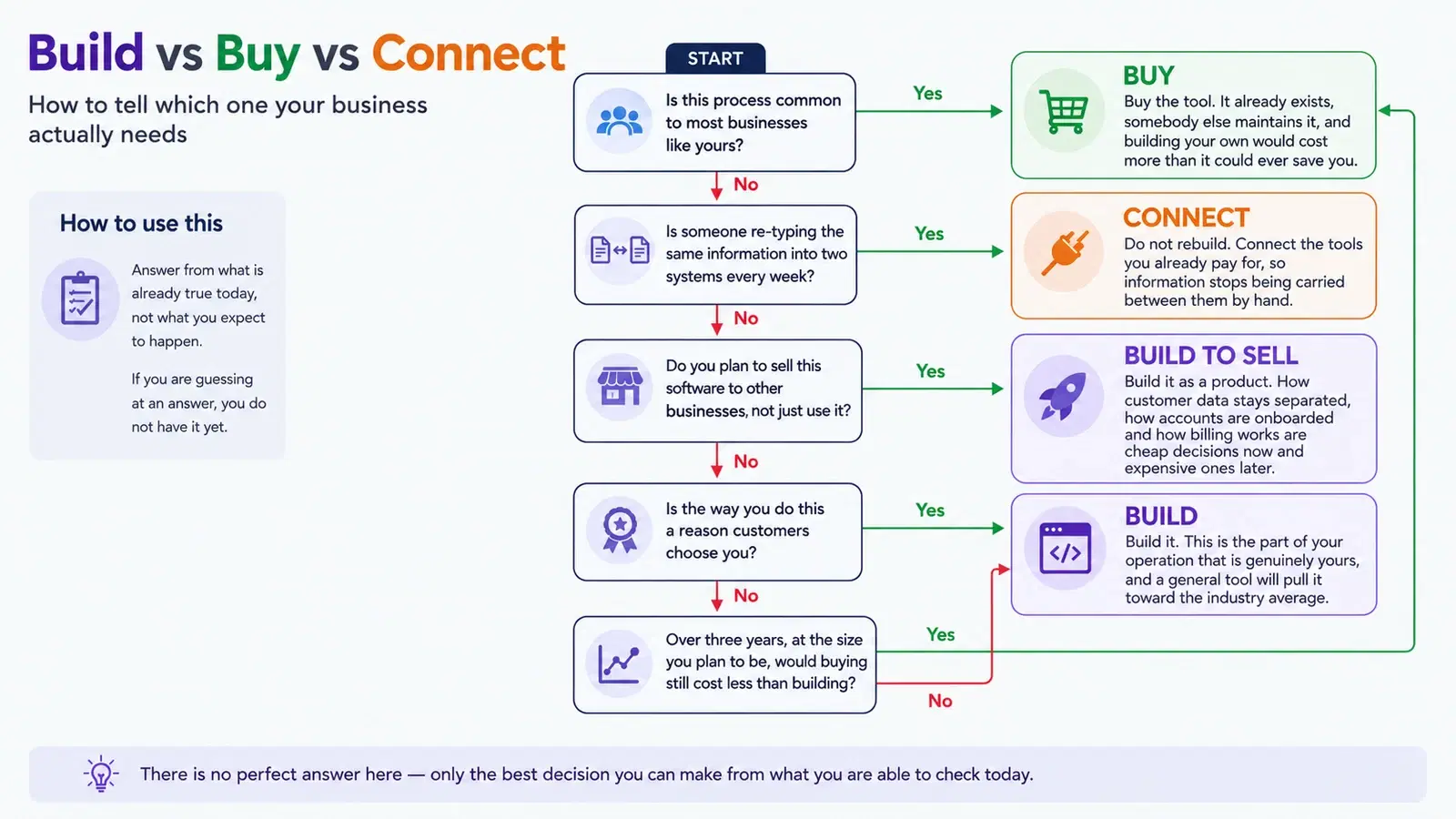
Custom software is worth building when the process it supports is genuinely specific to how your business runs, and when the cost of working around a ready-made tool — re-typing data, paying for add-ons, reconciling two systems by hand — has quietly become a standing monthly expense. For everything a thousand other businesses do the same way — accounting, payroll, email, invoicing — buy the tool: it already exists, somebody else maintains it, and building your own would be spending money to end up behind where you started.
On this page
- What custom software development actually means
- Custom software vs off-the-shelf: the honest comparison
- The four situations where building genuinely pays
- Where buying wins, and building is a mistake
- What about building it with AI?
- Should you build? A test you can run in five minutes
- What actually drives the cost
- What to insist on before you sign anything
- Build it so that it can be stopped
- What it comes down to
Almost every article on this subject is published by a company that sells custom software. That is worth holding in mind while you read this one, because we sell it too. So here is the part that costs us work, before anything else.
Buy before you build. Accounting, payroll, email, file storage, invoicing, straightforward scheduling — these are solved problems, sold as products that thousands of businesses depend on and that a full-time team maintains on your behalf. Commissioning any of it as a custom build would be spending a great deal of money to end up behind where you started.
Custom software earns its cost in a narrower band than this industry likes to admit. Inside that band it is often the only thing that works, and businesses stay outside it for years while the workarounds quietly cost them more than the build would have. This article is about finding out which side of that line your problem is actually on.
What custom software development actually means
Custom software development — you will also see it called custom application development, and the two mean the same thing — is building an application around one organization’s process, instead of buying a general one and reshaping the organization to fit it. Stripped of the jargon, what gets built is a database, a set of rules and a handful of screens: job scheduling, quoting, dispatch, stock, a customer portal, an internal system that finally replaces the spreadsheet nobody wants to touch. It is the work we do as a custom software development company in Calgary, and the discovery that comes before a build is usually worth more than the code that follows it.
It is worth separating it from four things it gets confused with, because the wrong category leads to the wrong spend:
- A website presents your business to people who do not know it yet. Custom software runs something. They overlap when the running happens in public — bookings, portals, quoting — which is also where a website builder stops being enough.
- A mobile app is a delivery route, not a category of software. The real question is where the work happens: if it happens at a desk, an app is an expensive way to reach the same database — which is the longer argument in do you actually need a mobile app.
- Automation connects tools you keep, rather than replacing them. If your problem is that two systems you are happy with do not talk to each other, workflow and AI automation is a much smaller bill than an application.
- Multi-tenant SaaS is custom software you intend to sell to other businesses. Same craft, different economics, and the decisions that make it possible are made in the first fortnight or not at all. The decision to build one is covered further down; how one is actually built lives on the multi-tenant SaaS development service page rather than here.
None of this is exotic any more. In its 2023 Survey of Digital Technology and Internet Use, Statistics Canada found cloud computing to be the most commonly used information and communication technology among Canadian businesses with five or more employees, at 48 per cent. Running a business on software somebody else owns and maintains is ordinary now, not a compromise. The only question this article asks is which part of it should not be.
Custom software vs off-the-shelf: the honest comparison
Comparison tables on this subject are usually written to make one column look foolish. This one is not. Read down whichever column describes what you actually need.
| The question | A ready-made tool | A custom build |
|---|---|---|
| What are you buying? | A ready-made toolA licence to use a product built for a market. | A custom buildAn application built around one process, and the code behind it. |
| Who decides what it does next? | A ready-made toolThe vendor, guided by what most of its customers want. | A custom buildYou — limited by budget, rather than by a roadmap you cannot influence. |
| How fast can you start? | A ready-made toolDays. The product already exists. | A custom buildWeeks to months before anyone is using anything. |
| What happens when you need a change? | A ready-made toolRequest it and wait, or build a workaround. | A custom buildIt is scoped, paid for, and it happens. |
| What does it cost? | A ready-made toolCommonly per user, per month, indefinitely — and it rises as you hire. | A custom buildMore up front, then hosting and maintenance that do not scale with headcount. |
| What happens if you stop paying? | A ready-made toolAccess ends. Export what you can before it does. | A custom buildYou still have the code, the data and a running system — provided ownership was settled in writing. |
| Who is accountable when it breaks? | A ready-made toolA support queue and a status page. | A custom buildWhoever you hold a contract with — worth something only if it is written down. |
Notice that the two columns do not disagree about quality. Ready-made products are frequently more thoroughly tested than anything built for a single customer, simply because far more people have already run into the bugs. What you are trading is not quality for quality. It is fit and control against speed and cost.
The four situations where building genuinely pays
In practice, the businesses that get their money back from a custom build are in one of four positions.
1. The process is the thing you are good at
If the way you quote, schedule, route or hand over work is a reason customers choose you rather than the firm down the road, a general tool will steadily average it toward what everyone else does. That is the one direction you cannot afford to move. This is the strongest case for building, and the rarest: most processes feel distinctive from the inside and turn out to be ordinary when written down.
2. The workaround has become somebody’s job
Someone re-types orders from one system into another. Someone reconciles two products by hand every Friday. Someone maintains a spreadsheet that is load-bearing in your operation and that nobody else fully understands. None of this appears on an invoice, which is exactly why it survives for years — but it is a salary line, it is where jobs and enquiries go missing, and it fails on the day that person is away.
3. You are paying for a whole product to use a fraction of it
Three subscriptions stacked up to approximate one thing you actually want is a familiar shape, and so is per-seat pricing that grows with headcount rather than with the value you get. Neither is proof that you should build — but both are worth costing out at the size you plan to be in three years, rather than the size you are now. That arithmetic is often the entire decision.
4. You intend to sell the software, not only use it
If the plan is for other businesses to pay for it, you are building a product rather than an internal tool, and it should be scoped as one from the first day. How each customer’s data stays separated, what they can configure themselves, and how a new account gets onboarded are cheap decisions early and expensive ones later. If you are still testing whether anyone wants it, start with an MVP and find out before you build the rest.
Where buying wins, and building is a mistake
The reverse cases matter just as much, and they are more common. Do not build when:
- The process is ordinary and only feels special because it is yours. Write it down and show it to somebody in a different industry. If they recognize it, buy the tool.
- What you actually dislike is the interface. Building to escape a tool that irritates you, rather than a limit you have genuinely hit, is the most expensive mistake in this article.
- Nobody can state the rules, including the exceptions. Software cannot hold an opinion that has never been settled, and paying developers to sit through that argument is the slowest possible way to have it.
- The area is heavily regulated and changes often. Payroll and tax are the clearest examples: a large part of what a vendor sells there is tracking rule changes so you do not have to.
- Nobody inside the business will own it. Custom software needs someone who decides what it does next. Without that person it drifts for a year and gets replaced by a spreadsheet.
- You need it next month. Buying is the only honest answer to a deadline that short, and you can always build later with much better information.
There is also a middle path that the industry under-sells, because it bills poorly: keep the ready-made tools, and build only the small piece that connects them or covers the gap. A great many problems that arrive described as "we need a system" are solved by one integration and a report.
What about building it with AI?
This now comes up in the first meeting, and it deserves a straight answer rather than a sales pitch in either direction.
AI coding tools have genuinely changed what it costs to produce working code. Small internal tools that were never worth commissioning have moved inside the range of what a business can reasonably have built, and that is a real shift rather than a talking point.
What they have not changed is most of what a business build actually consists of. Deciding what the rules actually are, uncovering the exceptions your team applies from memory, persuading a stubborn system to give up its data, migrating years of inconsistent records, and being accountable at two in the morning — none of that is typing, and typing is the part that got cheaper. On a business build, the rest is where the cost lives.
The specific risk worth naming is a system that demonstrates beautifully and that nobody can maintain: no one can say why a rule is written the way it is, what happens to customer data, or what breaks if it changes. That is not an argument against the tools. It is an argument for exactly what this article has asked for throughout — a written scope, source you can read, and somebody accountable for what ships. Used well, AI moves the line. It does not remove it.
Should you build? A test you can run in five minutes
Tick only what is already true. Nothing here is a prediction, and anticipating a problem is not the same as having one.
Check your own situation
The build-or-buy test
Eight statements about how your business runs today. Tick the ones you could point at evidence for this week.
Tick whatever is true. Nothing is sent anywhere — the result appears here and goes no further.
What actually drives the cost
We are not going to print a price range here. Anyone who quotes one before seeing your process is quoting a different business, and the ranges published on agency sites are wide enough to be useless in both directions. What can be said usefully is what the number is made of, so you can tell whether a quote in front of you has been thought about.
- 1How many kinds of user. Each distinct role brings its own screens, permissions and decisions. A tool for one role is a fraction of the cost of one serving four.
- 2How many systems it has to talk to. The cost of an integration depends almost entirely on whether the other system has documented, supported access. One that does not is where estimates go wrong, and it is worth establishing before anybody signs.
- 3The exceptions. The main rule is cheap. The exceptions your team applies from memory, and has never written down, are the project — and every one that surfaces late arrives as a change request.
- 4The data you are bringing with you. Migrating years of inconsistent records is regularly larger than the feature that needed them, because someone has to decide what happens to every record that does not fit.
- 5What kind of data it is. Payments, health information and personal records raise the bar on storage, access and testing, and they should.
- 6Whether the business has decided. Requirements that are still being argued about internally get billed as time. Discovery is where that argument is meant to happen, and it is much cheaper there.
What to insist on before you sign anything
Most of what goes wrong with a custom build is not technical, and almost all of it is decided before the work starts. Whichever custom software development company you end up hiring — ours or anybody else’s — six things belong in writing:
- 1Ownership, named explicitly: the code, the data, the hosting accounts and the domain in your name, and you can leave with all of it.
- 2Access to the source from the first week rather than at handover. A repository you can see is the difference between a supplier and a dependency.
- 3A written answer on maintenance: who applies security updates after launch, how quickly, and what it costs per year.
- 4A first release you could genuinely use, early, in production — not a demonstration in month six. If nothing is usable until the end, the whole budget rides on one untested assumption.
- 5An exit that is not a negotiation: what happens to the system, the accounts and the documentation if you stop working together.
- 6Where the data lives, who can reach it, and what happens to it when the relationship ends.
That last point deserves a sentence of its own. Owning the software means holding the information inside it. What you are responsible for depends on your organization and where you operate, so it is a question for someone qualified to answer for your situation — the Office of the Privacy Commissioner of Canada publishes a privacy guide for businesses that is the right place to start reading. Ask any prospective developer where customer data would be stored and who can reach it. Anyone who has thought about it will answer in the first thirty seconds.
Build it so that it can be stopped
The largest risk in a custom project is not building the wrong thing. It is spending the entire budget before anybody has used any of it, which is what turns a wrong assumption into a write-off instead of a correction.
A build that respects your money is sequenced so that you could walk away at the end of any stage and still hold something worth having:
- 1Discovery, paid and short. The output is a written map of the process, the roles, the exceptions and the integrations. It is yours whether or not the build ever happens, and it is what a second opinion needs in order to be worth anything.
- 2The thinnest useful slice, in real use. One workflow, one group of users, in production with real data. This is where you find out whether the software matches the operation, while changing your mind is still cheap.
- 3Everything else, in the order the business decides — informed by a team that has now used the thing rather than imagined it.
If a proposal contains no such stopping point, that is not a scheduling detail. It is a risk being transferred quietly from the supplier to you.
What it comes down to
Buy what is common. Build what is genuinely yours. The hard part is being honest about which is which, and the test in this article exists because that honesty is much easier with evidence in front of you than in the abstract.
The businesses that get the most from custom software are not the ones that build the most of it. They are the ones that were specific: they knew which part of the operation was actually theirs, bought everything else off a shelf without sentiment, and could say in one sentence what the build was supposed to stop costing them.
Common questions
What is custom software development?
Custom software development is building an application around one organization’s process, instead of buying a general product and adapting the organization to fit it. In practice that usually means a database, a set of business rules and a handful of screens covering something specific — scheduling, quoting, dispatch, stock or a customer portal — together with the integrations that connect it to the systems already in use.
Is custom software cheaper than paying for subscriptions?
Sometimes, and the honest answer is that it depends on numbers only you have. A custom build costs more up front and then carries hosting and maintenance that do not rise with headcount, whereas per-seat subscriptions cost little to start and rise as you hire. The comparison worth making is the total for both options at the size you expect to be in three years, including the labour currently spent on workarounds. Anyone who answers this without asking about your team size is guessing.
How long does custom software take to build?
Longer than buying a product and shorter than most people fear, but the useful answer is that it should not be a single wait. A well-run project puts a first usable slice into real use early and adds to it, rather than delivering everything at the end. If a proposal has nothing in production until the final month, ask why, because that structure puts the whole budget behind one untested assumption.
Who owns custom software once it is built?
Whoever the agreement says, which is exactly why it needs to be written down before the work starts rather than assumed. Ownership should cover the source code, the data, the hosting accounts and the domain, and it should be clear that you can take all of it elsewhere. Third-party components used inside the build carry their own licences, so ask for those to be listed too.
What happens if we stop working with the developer who built it?
If ownership, source access and documentation were settled at the start, another team can pick the system up: that is the normal case and it is a routine handover. If they were not, you may find the code, the accounts or the deployment process sit with the supplier, and the cost of leaving becomes the cost of rebuilding. This is decided by the contract at the beginning, not by the goodwill at the end.
Do we need custom software, or just automation?
If the tools you already pay for do the job but do not talk to each other, automation is the smaller and better answer: it connects what you have and removes the re-typing without introducing a new application to maintain. Custom software is the right call when the thing you need does not exist in any tool you can buy, or when the process itself is a reason customers choose you.
Can we just build it with AI instead of hiring a developer?
For something small, self-contained and internal, increasingly yes, and that is a genuine change worth knowing about. What AI tools have made cheaper is producing code. What they have not made cheaper is deciding what the software should do, uncovering the exceptions nobody has written down, connecting to systems that resist being connected to, migrating messy historical data, and being accountable when it breaks — and on a business build those are most of the cost. The practical risk is ending up with something that demonstrates well but that nobody can explain, maintain or safely change, so the same protections apply either way: a written scope, source code you can read, and a named person responsible for what ships.
Can custom software work with the tools we already use?
Usually, and it should — replacing everything at once is rarely necessary and rarely wise. What determines the effort is whether each existing system offers documented, supported access for other software to use. That is worth checking during discovery rather than after a quote is accepted, because a system without it is the most common reason an integration estimate turns out to be wrong.
Is custom software worth it for a small business?
It can be, but the bar is higher than for a large one, because a small team feels both the up-front cost and the maintenance more sharply. The cases that tend to pay off are narrow: one process that is genuinely specific to how the business works, or one workaround that has grown into a recurring labour cost. Buying products for everything else and building only that piece is usually the better shape than a single system meant to run the whole business.
How do we choose a custom software development company?
Judge the questions they ask before the quote, not the portfolio. A firm that quotes a number before understanding your process, your exceptions and the systems it has to connect to is pricing a different business. Ask who owns the code and the data, when you get access to the source, who applies security updates after launch and what that costs per year, and what happens to the system if you stop working together. Ask what the first usable release is and when it goes into real use — if nothing is in production until the final month, the whole budget sits behind one untested assumption.
What is multi-tenant SaaS, and how is it different from an internal tool?
Multi-tenant SaaS is one application serving many separate customer organizations from a single deployment, each with its own users, data and settings. The difference from an internal tool is not the features but the foundations: how strictly each customer’s data is kept apart, what they can configure without a code change, how new accounts are onboarded and billed. Those choices are inexpensive at the start of a build and costly to retrofit once real customers are on it.
If you want help with this
- Custom software and SaaS development — The discovery, architecture and build for an operation that has outgrown what it can buy.
- AI and automation — The smaller answer when the tools are right but the re-typing between them is the real cost.
- MVP development — For software you intend to sell, before the full product is committed to.